Tuesday, 12 December 2017

Netmiko01_CampusNetwork


This posts needs editing.. end to end connectivity is ok. But netmiko4.py script is not working.

- no neg?


Checking the files...


#!/usr/bin/env python

from netmiko import ConnectHandler

iosv_l2_s1 = {
    'device_type': 'cisco_ios',
    'ip': '192.168.122.71',
    'username': 'adrian',
    'password': 'cisco',
}

iosv_l2_s2 = {
    'device_type': 'cisco_ios',
    'ip': '192.168.122.72',
    'username': 'adrian',
    'password': 'cisco',
}

iosv_l2_s3 = {
    'device_type': 'cisco_ios',
    'ip': '192.168.122.73',
    'username': 'adrian',
    'password': 'cisco',
}

iosv_l2_s4 = {
    'device_type': 'cisco_ios',
    'ip': '192.168.122.74',
    'username': 'adrian',
    'password': 'cisco',
}

iosv_l2_s5 = {
    'device_type': 'cisco_ios',
    'ip': '192.168.122.75',
    'username': 'adrian',
    'password': 'cisco',
}


with open('iosv_l2_access') as f:
    lines = f.read().splitlines()
print lines


all_devices = [iosv_l2_s5, iosv_l2_s4, iosv_l2_s3, iosv_l2_s2, iosv_l2_s1]

for devices in all_devices:
    net_connect = ConnectHandler(**devices)
    output = net_connect.send_config_set(lines)
    print output


+++


+++
Ensure no loop is happening. This will break the python script as seen below:


+++

'iosv_l2_config1' or 'iosv_l2_access' file


vlan 2
int range g2/0 - 3
switchport mode access
switchport access vlan 2

int range g0/0 - 3
switchport trunk encapsulation dot1q
switchport mode trunk
switchport nonegotiate
switchport trunk allowed vlan 1,2
spanning-tree link-type point-to-point   --> makes link more stable, then SHR (shared)

int range g1/0 - 1
switchport trunk encapsulation dot1q
switchport mode trunk
switchport nonegotiate
switchport trunk allowed vlan 1,2
spanning-tree link-type point-to-point


Monday, 11 December 2017

Docker...

Docker Container


Go to GNS3 Marketplace, download openvswitch.


or Pull from  https://hub.docker.com/


- Leave start command empty, click next, next until finish.
Note: remove 'docker pull'. Just the 'turnkeylinux/wordpress...'

- You can also use GNS3 Marketplace to pull an image via import 'xyz.gns3a'
eg. ipterm

- Optionally, you can use the Cloud as a dhcp server.


or via nano command


Other notes:

/# passwd  -->  setting up a password for linux, so you can ssh into it..


New files and reading from a file


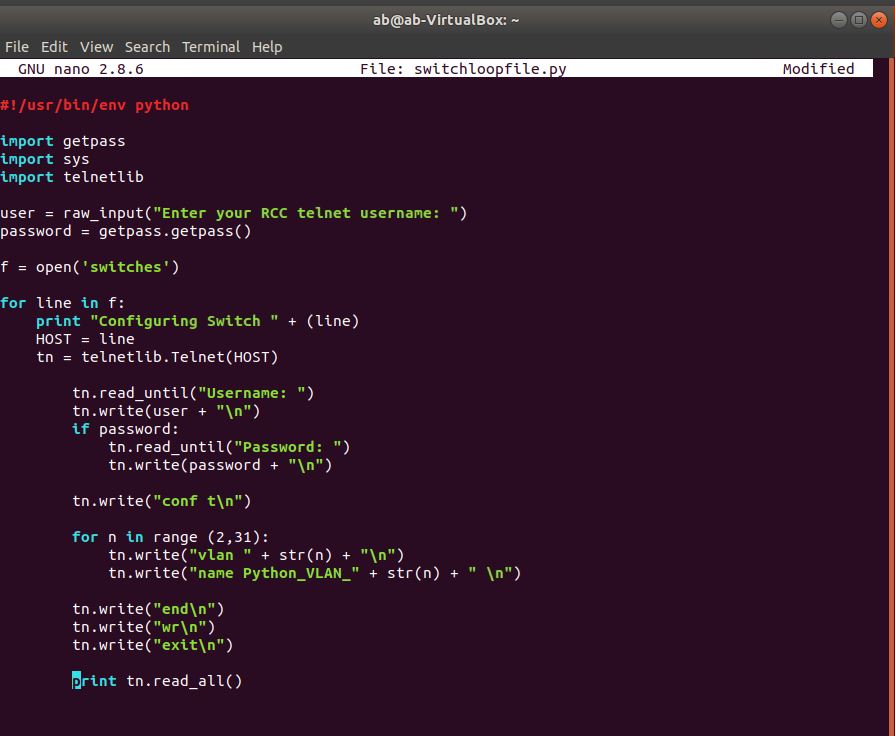
Switchloopfile.


ls -lh  --> listing in a human readable file.


Exact number of indentation is important.


#!/usr/bin/env python
import getpass
import sys
import telnetlib
user = raw_input("Enter your username: ")
password = getpass.getpass()
f = open ('myswitches')
for line in f:
print "Configuring Switch " + (line)
HOST = line
tn = telnetlib.Telnet(HOST)
tn.read_until("Username: ")
tn.write(user + "\n")
if password:
tn.read_until("Password: ")
tn.write(password + "\n")
tn.write("conf t\n")
for n in range (2,26):
tn.write("vlan " + str(n) + "\n")
tn.write("name Python_VLAN_" + str(n) + "\n")
tn.write("end\n")
tn.write("exit\n")
print tn.read_all()

Install Netmiko 2


Basic SW configs:


!
hostname SX
!
enable password cisco
!
username adrian privilege 15 password 0 cisco
no aaa new-model

!
ip domain-name cciepython.com
!
!
interface Vlan1
 ip address 192.168.122.X 255.255.255.0


line vty 0 4
 login local
 transport input ssh
!
crypto key generate rsa
1024
.


#!/usr/bin/env python
from netmiko import ConnectHandler
iosv_l2_s1 = {
'device_type': 'cisco_ios',
'ip': '192.168.122.71',
'username': 'adrian',
'password': 'cisco',
}
iosv_l2_s2 = {
'device_type': 'cisco_ios',
'ip': '192.168.122.72',
'username': 'adrian',
'password': 'cisco',
}
iosv_l2_s3 = {
'device_type': 'cisco_ios',
'ip': '192.168.122.73',
'username': 'adrian',
'password': 'cisco',
}
all_devices = [iosv_l2_s1, iosv_l2_s2, iosv_l2_s3]
for devices in all_devices:
net_connect = ConnectHandler(**devices)
for n in range (2,21):
print "Creating VLAN " + str(n)
config_commands = ['vlan ' + str(n), 'name Python_VLAN ' + str(n)]
output = net_connect.send_config_set(config_commands)
print output

Demo: Interface Profiles

Create Leaf Interface Profile